Overview
If the GFI Archiver Search service is crashing repeatedly, search indexes are no longer updating, or the web interface does not load, the issue can be related to the Word Breaker configuration. The documented Language Analyzer options show that Enable built-in word breaker is the recommended setting, and the existing crash workaround uses the same setting by changing MArcSettings.xml directly when the web interface cannot be used.
The event log may include the following error message:
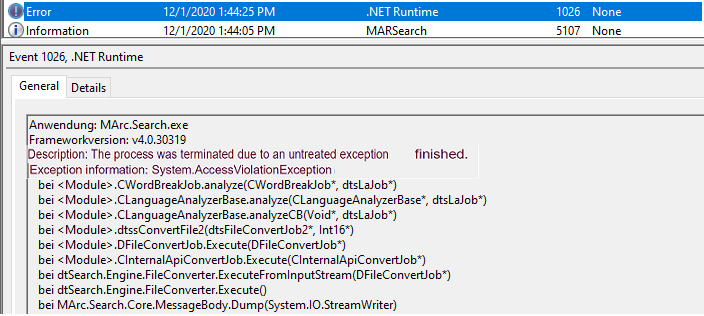
Symptoms
You may notice one or more of the following symptoms:
- The GFI Archiver Search service stops or crashes repeatedly.
- One or more search indexes stop updating.
- The web interface does not load.
- Search functionality is unavailable or incomplete.
Solution
Option 1: If the web interface is accessible
Use the documented Word Breaker configuration path:
- Open GFI Archiver.
- Navigate to Configuration > Archive Stores.
- Click Index Management.
- Under the Language Analyzer options, select Enable built-in word breaker.
- Click Save.
Option 2: If the web interface is not accessible
Configure the same setting directly in MArcSettings.xml:
- Stop all Archiver Services.
- Navigate to
..\InstallationFolder\Core\Data\MArcSettings.xml. - Take a backup of
MArcSettings.xml. - Set the value of
<EnableBuiltInWordBreaker>totrue. - Save the file.
- Restart all Archiver services.
Validation
After applying the change:
- Confirm that the GFI Archiver Search service stays running.
- Confirm that the web interface opens normally.
- Confirm that indexing resumes for the affected archive store or stores.
If the issue persists
If the Search service continues to crash after enabling the built-in word breaker:
- Rebuild the affected Archive Store Index.
- Monitor the system and Archiver logs for additional errors.
- Gather Troubleshooter Logs for Archiver for deeper review.
FAQ
-
What does
<EnableBuiltInWordBreaker>do?
It enables the built-in Word Breaker used by GFI Archiver, which is the recommended Language Analyzer option in the documented Word Breaker configuration. -
When should I edit
MArcSettings.xmlmanually?
Use the manual edit when the web interface is not accessible and you cannot reach Configuration > Archive Stores > Index Management to change the setting in the UI. -
What should I do if search is still not working after this change?
Rebuild the affected Archive Store Index and, if needed, collect Troubleshooter Logs for Archiver.
Related Articles:
- Gathering Troubleshooter Logs for Archiver
- Configuring the Word Breaker
- Rebuild an Archive Store Index
Priyanka Bhotika
Comments